Best Local AI Models for iPhone in 2026: 9 On-Device LLMs Benchmarked
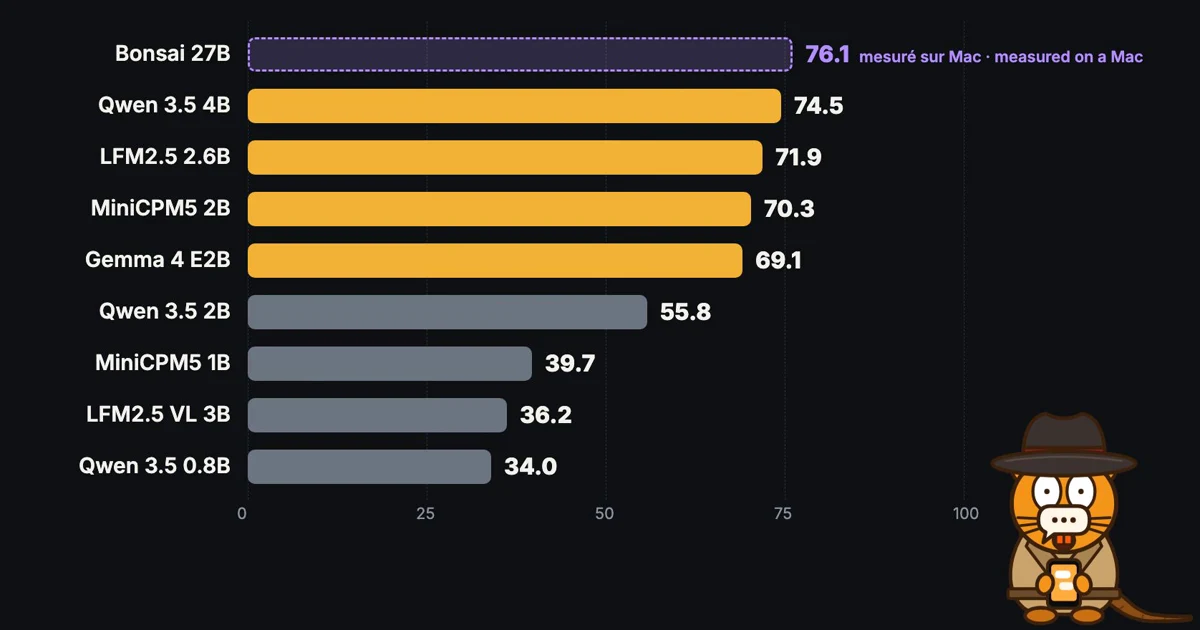
Which open AI model should you run on an iPhone? We tested nine of them on an iPhone 17e with 8 GB of memory, inside Ragondin Assistant, with the same 220 questions from public benchmarks. Here is the short answer, then every number behind it.
The short answer
- Best answers on an iPhone: Qwen 3.5 4B, 74.5 / 100, about 18 seconds per question.
- Best speed for the quality: MiniCPM5 2B, 70.3 / 100, about 8 seconds per question, and the best of all nine at following instructions.
- The top four phone models are close to a tie. With 220 questions, each score is good to about ±5 points; time per answer is what separates them.
- Bonsai 27B scored highest overall (76.1), but an 8 GB iPhone cannot keep it running flat out: the GPU restarts under the load. It works for normal, one-at-a-time chat.
- Below 2 billion parameters, quality drops fast. The smallest models are about four times faster and mostly guess on hard questions.
Full results
Score out of 100: the four categories (knowledge, math, French & Chinese, instructions) weighted equally. An answer still being written when it hits the 2,048-token limit counts as wrong. Speed is the median tokens per second while answering; time per question is the average.
| Model | Score /100 | Knowledge /70 | Math /50 | FR + ZH /50 | Instructions /50 | Tokens/s | Per question | Full run |
|---|---|---|---|---|---|---|---|---|
| Bonsai 27B (on a Mac) | 76.1 | 34 | 46 | 43 | 39 | — | — | — |
| Qwen 3.5 4B | 74.5 | 35 | 43 | 41 | 40 | 10.5 | ~18 s | 67 min |
| LFM2.5 2.6B | 71.9 | 32 | 42 | 39 | 40 | 14.8 | ~61 s | 251 min |
| MiniCPM5 2B | 70.3 | 26 | 43 | 35 | 44 | 16.7 | ~8 s | 33 min |
| Gemma 4 E2B | 69.1 | 27 | 43 | 36 | 40 | 14.1 | ~17 s | 61 min |
| Qwen 3.5 2B | 55.8 | 19 | 34 | 33 | 31 | 17.2 | ~13 s | 56 min |
| MiniCPM5 1B | 39.7 | 16 | 25 | 16 | 27 | 39.7 | ~5 s | 23 min |
| LFM2.5 VL 3B | 36.2 | 23 | 16 | 4 | 36 | 20.7 | ~3 s | 20 min |
| Qwen 3.5 0.8B | 34 | 14 | 22 | 14 | 22 | 38.6 | ~4 s | 16 min |
Every question and every answer is published: the raw data.
Which model should you use?
For the best answers on an 8 GB iPhone: Qwen 3.5 4B
Qwen 3.5 4B is first among the models that ran the whole test on the phone, and it leads in knowledge (35 of 70). It is also the slowest of the top group at about 10 tokens per second, so expect around 18 seconds for a typical answer.
For speed: MiniCPM5 2B
MiniCPM5 2B is within five points of the leader, finished all 220 questions in 33 minutes (against 67 for Qwen 3.5 4B), and scored 44 of 50 on instruction following, ahead of every bigger model. Its typical answer is about 80 tokens, against 157 for Qwen 3.5 4B.
Strong, but slow: LFM2.5 2.6B
LFM2.5 2.6B is as accurate as the leaders, but it reasons before almost every answer, even with its thinking mode switched off. A typical answer with its hidden draft runs to 661 tokens, so a question takes about a minute and the full test took four hours and ten minutes. It also lost points to the token limit: 33 of its 220 answers were cut off, against one for Qwen 3.5 4B. Without that rule it would have scored 75.5.
Gemma 4 E2B
Google's Gemma 4 E2B lands in the same group at 69.1, with a speed close to Qwen 3.5 4B.
Not for serious questions: the sub-2B models and the vision model
Qwen 3.5 0.8B and MiniCPM5 1B answer in 4 to 5 seconds and are fine for simple rewriting, but they score 34 and 40. LFM2.5 VL 3B can read images, yet it got only 4 of 50 math questions right in French and Chinese.
Category by category
- Knowledge (MMLU-Pro, 70 hard multiple-choice questions across 14 subjects): no model gets more than half right. Best: Qwen 3.5 4B with 35.
- Math (GSM8K word problems): the top phone models reach 43 of 50; Bonsai 27B reaches 46.
- French and Chinese (MGSM, the same kind of math in other languages): Bonsai 27B 43, Qwen 3.5 4B 41.
- Following instructions (IFEval, rules like "answer in exactly four bullet points"): MiniCPM5 2B wins with 44 of 50.
Why the best model could not finish on the phone
Bonsai 27B is a 27-billion-parameter model compressed to about one bit per weight, so its file is about 3.8 GB instead of the 15 GB or more a 27B model normally needs. It loads on the iPhone 17e and works in a normal chat. But a benchmark keeps the GPU busy without a break, and early in the run the GPU hit a hardware error and iOS restarted it (GPURestartBegin). After that, every answer came back empty in about 40 milliseconds.
So we ran the same 220 questions, with the same settings and the same llama.cpp version, on a MacBook Pro (M1 Pro). That is where its 76.1 comes from.
How we tested
- Device: iPhone 17e, 8 GB of memory, iOS 27. Every phone model ran inside Ragondin Assistant on the GPU, through llama.rn 0.12.9 (llama.cpp build b10256).
- Questions: 220, sampled with a fixed seed: MMLU-Pro (5 per subject × 14 = 70), GSM8K (50), MGSM French (25) and Chinese (25), IFEval (50).
- Settings: temperature 0 (always the single most likely answer), up to 2,048 tokens per answer. An answer cut off at the limit counts as wrong: on a phone, an answer you never get is no answer.
- Heat: before each model, the phone cooled down until iOS reported its thermal state as "nominal".
- Score: the four category percentages averaged, out of 100. Margin of error about ±5 points (95%).
- Dates: phone runs on October 8, 2026 (Gemma 4 E2B on October 7); Bonsai 27B on a Mac on October 7, 2026.
Building your own on-device AI feature? The engineering lessons (sustained GPU load, a cache bug that skewed our first run, choosing a model per device) are on the Ragondin Dev blog: Shipping on-device LLMs on iPhone.
Limits of this test
- One phone. Results on iPhones with less memory, or on Android, will differ.
- 220 questions separate the groups, not models within five points of each other.
- Benchmarks measure knowledge and reasoning, not tone or how pleasant a model is to talk to.
- Models update often; these numbers describe the versions tested in October 2026.
Watch the video
The results, the crash, and the four-hour model, in seven minutes, with English and French audio: I Tested 9 AI Models on an iPhone. The Best One Crashed It. The story behind the benchmark is on Fabien Martin's blog.
Try these models on your phone
Ragondin Assistant runs AI entirely on your iPhone or Android phone: no cloud, no account, and it works in airplane mode. Pick a model, download it once, and chat privately.
Choosing an app rather than a model? See the offline AI apps compared, for iPhone and for Android.
FAQ
What is the best local AI model for iPhone in 2026?
On an 8 GB iPhone, Qwen 3.5 4B gave the best answers in our 220-question test (74.5 / 100). MiniCPM5 2B was close (70.3) and twice as fast per question.
Can an iPhone run a 27-billion-parameter model?
Yes, if it is compressed enough. Bonsai 27B, at about one bit per weight, loads and chats on an iPhone 17e. It could not sustain a 220-question benchmark: the GPU restarted under continuous load.
How fast is local AI on an iPhone?
Between about 10 and 40 tokens per second on an iPhone 17e. The models that score well run at 10 to 17 tokens per second: roughly 8 to 18 seconds for a typical answer. Models that reason before answering can take a minute.
Does local AI on iPhone work offline?
Yes. Every model in this test ran entirely on the phone, with no server and no internet connection once the model is downloaded. That is how Ragondin Assistant works.
How much memory does a local AI model need on iPhone?
The 2B to 4B models in this test take roughly 1.5 to 3 GB on disk and run comfortably on an 8 GB iPhone. With less memory, choose a smaller model and expect lower scores.